If you recently visited Culver’s and noticed a survey invitation on your receipt, you may be searching for the TellCulvers com survey. The survey is Culver’s guest feedback program, designed to collect opinions about individual restaurant visits, food, service, cleanliness, and the overall guest experience.
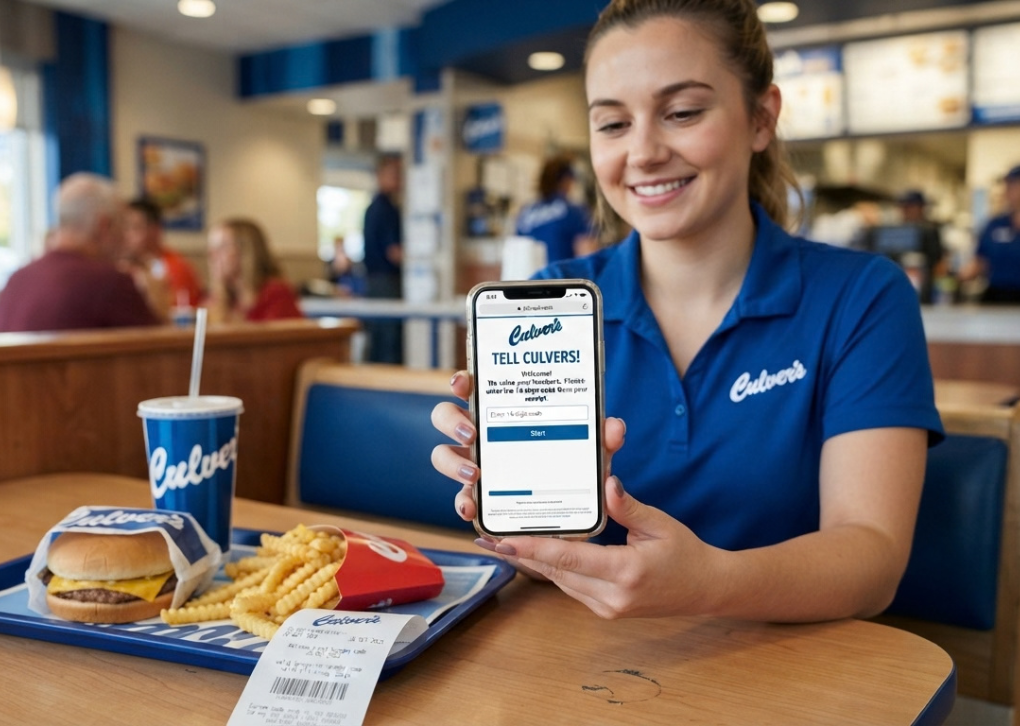
The official survey page asks visitors to enter information printed on their receipt, including a 15-character survey code. After completing the questionnaire, the site states that participants receive a validation code that can be used to redeem the offer printed on the receipt.
That makes the process fairly straightforward. However, there are a few details worth understanding before you start, especially if you are unsure where to find the code, what questions to expect, or whether the survey is the same thing as Culver’s current rewards and sweepstakes programs.
What Is the TellCulvers com Survey?
The TellCulvers com survey is Culver’s online Guest Satisfaction Survey. Its purpose is to give customers a way to report what happened during a recent restaurant visit.
Rather than being a general questionnaire about the Culver’s brand, the survey is tied to information from a particular receipt. The official survey landing page specifically asks users to enter a 15-character Survey Code from their receipt.
This distinction matters because the receipt connects your feedback to an actual transaction or visit.
The survey can help customers communicate feedback about areas such as:
- Food quality
- Order accuracy
- Restaurant cleanliness
- Staff service
- Speed of service
- Overall satisfaction
- Specific aspects of the dining experience
- Reasons for being satisfied or dissatisfied
The exact questions can vary depending on the survey flow and visit information.
Why Does Culver’s Ask Customers to Complete Surveys?
Customer surveys provide restaurants with structured feedback that can be used to identify recurring issues and understand guest expectations.
Culver’s has also stated that guest feedback influences its menu development and guest-experience efforts. In a 2026 company announcement, Culver’s said feedback from guests contributed to product decisions and menu innovation.
So the survey isn’t simply a promotional form. It is part of a broader feedback process.
How to Access the TellCulvers com Survey
The safest approach is to use the survey address printed on your Culver’s receipt or access the official TellCulvers survey website directly.
The official survey currently displays a Culver’s Guest Satisfaction Survey – Welcome page and requests the survey code from the receipt.
When accessing the survey:
- Keep your Culver’s receipt nearby.
- Locate the survey or feedback section.
- Find the 15-character Survey Code.
- Open the official TellCulvers survey page.
- Enter the requested code.
- Continue through the questionnaire.
- Answer the questions based on your actual visit.
- Submit the survey.
- Record the validation code shown at the end.
- Follow the redemption instructions printed on your receipt.
A useful detail appears directly on the official survey page: do not use the letter “O” when entering the Survey Code. This is presumably intended to prevent confusion between the letter O and the number zero.
What Information Do You Need Before Starting?
You generally do not need to prepare complicated information.
The most important item is your Culver’s receipt containing the survey code.
Before beginning, check that:
- The receipt is readable.
- The survey code is still visible.
- You enter every character correctly.
- You distinguish numbers from letters.
- You understand the offer printed on the receipt.
- You are prepared to complete the survey in one sitting.
The survey’s official welcome page specifically requests the receipt’s 15-character code.
Where Is the Survey Code?
The precise location can vary according to receipt formatting, but look for a section mentioning survey, feedback, guest satisfaction, or a validation offer.
Don’t confuse the survey code with other numbers on your receipt.
Receipts can contain transaction numbers, restaurant information, order numbers, dates, times, and other identifiers. The survey page specifically asks for a 15-character Survey Code, so entering an unrelated number may not work.
TellCulvers com Survey: Step-by-Step Instructions
The process is simple once you have the receipt.
Step 1: Find Your Receipt
Start with the receipt from your recent Culver’s visit.
If you received a digital receipt, check whether the survey invitation and required code are included there.
Step 2: Locate the 15-Character Code
Find the 15-character Survey Code requested by the official survey page.
Pay attention to similar-looking characters. The site explicitly tells participants not to use the letter “O” when entering the code.
Step 3: Open the Official Survey
Use the official TellCulvers survey website rather than an unfamiliar third-party page.
The official survey identifies itself as the Culver’s Guest Satisfaction Survey and explains that Culver’s values candid feedback from customers.
Step 4: Enter the Code
Type the code exactly as it appears.
Avoid adding spaces or changing characters unless the website specifically instructs you to do so.
Step 5: Answer the Questions Honestly
The best way to complete the questionnaire is to answer according to your actual experience.
Think about:
- How your order was handled
- Whether the food met expectations
- How quickly you received your order
- Whether employees were helpful
- Restaurant cleanliness
- Whether your order was accurate
- Your overall experience
If the survey asks you to explain why you selected a particular satisfaction level, provide a specific explanation rather than a vague statement.
For example, instead of saying “Everything was good,” a more useful response would explain that the order was accurate, served quickly, and the dining area was clean.
Step 6: Submit the Survey
Review your responses and submit the completed questionnaire.
Don’t close the browser immediately.
Step 7: Save Your Validation Code
According to the official survey page, completing the survey provides a validation code that can be used to redeem the offer printed on your receipt.
Write the code down or otherwise save it.
Step 8: Redeem the Receipt Offer
Take the validation code and your receipt to the appropriate Culver’s restaurant when you are ready to redeem the offer.
Pay close attention to the terms printed on the receipt because the offer may have specific redemption conditions.
What Questions Are Asked on the TellCulvers com Survey?
There isn’t necessarily one identical questionnaire for every visitor.
The questions can depend on the particular survey session and information associated with your visit.
However, customer satisfaction surveys commonly examine several parts of the restaurant experience.
Food Quality
You may be asked about the taste, temperature, freshness, presentation, or overall quality of your meal.
If something went wrong, explain what happened clearly.
Service Experience
Questions may focus on how employees interacted with you and whether your experience was pleasant and efficient.
Specific feedback is more useful than simply selecting a rating without explanation.
Order Accuracy
Did you receive everything you ordered?
If an item was missing, incorrectly prepared, or substituted, the survey gives you an opportunity to report it.
Restaurant Cleanliness
Customers can have very different impressions of a restaurant depending on the condition of dining areas, tables, floors, restrooms, and other visible areas.
If cleanliness influenced your rating, mention the specific issue.
Overall Satisfaction
You may also be asked to provide an overall assessment of the visit.
Try to consider the entire experience rather than focusing on one isolated moment.
What Happens After the TellCulvers com Survey?
The most important immediate result is the validation code.
Culver’s official survey page says that after completion, the participant receives a validation code that can be used to redeem the offer printed on the receipt.
This means the receipt remains important even after you finish the questionnaire.
Keep it available until you have successfully used the offer, particularly if the redemption terms require the original receipt.
Is the TellCulvers Survey the Same as Culver’s Delicious Rewards?
No. These are separate concepts.
The TellCulvers survey is focused on feedback about a restaurant visit. Delicious Rewards, meanwhile, is Culver’s customer loyalty program.
Culver’s current rewards page states that members earn points based on spending and can redeem those points for menu items.
Current listed redemption options include items such as:
- One-scoop frozen custard
- Crinkle cut fries
- Fountain drinks
- Onion rings
- ButterBurgers
- Chicken sandwiches
- Concrete Mixers
- Other qualifying menu items
The points required vary by item.
So, if you are searching for the TellCulvers com survey because you want the offer associated with your receipt, don’t assume that joining Delicious Rewards automatically substitutes for completing the survey.
Is TellCulvers Connected to Culver’s Sweepstakes?
Not necessarily.
This is another common source of confusion.
Culver’s runs separate promotions and sweepstakes with their own rules, dates, eligibility requirements, and entry procedures.
For example, Culver’s Journey to Delicious Sweepstakes ran from June 1 through August 2, 2026, with weekly challenges and a separate no-purchase entry method. Its official rules state that participants needed to be members of or enroll in Delicious Rewards.
That promotion was not the same thing as the ordinary Guest Satisfaction Survey.
The distinction is important because promotional pages can change over time, while a receipt-based survey has its own instructions.
TellCulvers com Survey Not Working? Try These Fixes
If the survey refuses to accept your information, don’t immediately assume the website is broken.
Try these checks first.
Check the Code Carefully
The most common issue may simply be an incorrect character.
Remember that the official page specifically warns users not to enter the letter O when entering the survey code.
Recheck the Receipt
Make sure you are using the correct receipt.
If you have several Culver’s receipts, compare the date, restaurant, and transaction details before entering the code.
Use a Modern Browser
Try the current version of Chrome, Edge, Safari, or another mainstream browser.
If the page behaves strangely, clearing temporary browser data or opening a private/incognito window can sometimes help.
Check Your Internet Connection
A weak connection can interfere with survey pages, particularly when the questionnaire loads several pages dynamically.
Don’t Guess the Code
If a character is genuinely unreadable, repeatedly guessing different combinations is unlikely to help.
Instead, use the contact options provided by Culver’s if you need assistance with a survey or promotion.
Culver’s maintains a dedicated Sweepstakes and Contests Support page for questions about promotions and directs users to its official rules for current sweepstakes.
How to Give Better Feedback in the TellCulvers Survey
If the survey provides an open-ended comment box, make your feedback concrete.
A useful response can include:
- What happened
- When it happened
- What worked well
- What could be improved
- How the issue affected your experience
For example, if your order was delayed, explain approximately how long you waited and whether employees communicated with you.
If the experience was excellent, explain why.
Specific praise can be just as valuable as criticism because it identifies behaviors and service elements that customers appreciate.
Is the TellCulvers Survey Worth Completing?
If your receipt includes a survey invitation and a validation offer you want to use, completing it can provide a practical reason to participate.
There is also a broader benefit: detailed customer feedback gives the restaurant more useful information than a simple star rating.
The key is to read the offer terms on your receipt before starting. The survey page confirms that the validation code is associated with the offer printed on the receipt, so the receipt remains the best source for the applicable redemption details.
TellCulvers com Survey: Important Things to Remember
Before starting, keep these points in mind:
- The survey is a Culver’s Guest Satisfaction Survey.
- You need the 15-character survey code from your receipt.
- The official page warns users not to use the letter O in the code.
- The survey asks for feedback about your Culver’s experience.
- After completing it, the site provides a validation code.
- That validation code can be used with the offer printed on the receipt.
- The survey is different from Delicious Rewards.
- It is also different from Culver’s individual sweepstakes and promotional campaigns.
- Always check your receipt for the specific redemption conditions.
Frequently Asked Questions About the TellCulvers com Survey
1. What is the TellCulvers com survey?
The TellCulvers com survey is Culver’s online Guest Satisfaction Survey. It allows customers to provide feedback about a recent restaurant visit. The official survey page asks for a 15-character code printed on the receipt and states that participants receive a validation code after completing the survey.
2. Where can I find the TellCulvers survey code?
The survey code is printed on the qualifying Culver’s receipt. The official survey page describes it as a 15-character Survey Code and specifically warns participants not to use the letter “O” when entering it.
3. What do I get after completing the Culver’s survey?
After completing the questionnaire, the official survey page says you will receive a validation code. That code can be used to redeem the offer printed on your receipt. The exact offer and redemption requirements should therefore be checked on the receipt itself.
4. Is the TellCulvers survey the same as Delicious Rewards?
No. The survey is a guest feedback mechanism, while Delicious Rewards is Culver’s loyalty program. Culver’s says Delicious Rewards members earn points from purchases and can redeem those points for qualifying menu items.
5. What should I do if my TellCulvers survey code does not work?
First, carefully re-enter the 15-character code and check for confusing characters. Remember that the official page says not to use the letter “O.” If the problem continues, verify that you are using the correct receipt and consider contacting Culver’s through its official customer-support channels rather than relying on unofficial survey websites.
Final Takeaway: Complete the TellCulvers Survey Correctly
The TellCulvers com survey is relatively simple once you know what to look for. Start with your recent Culver’s receipt, locate the 15-character survey code, enter it on the official Guest Satisfaction Survey page, and answer the questions honestly.
Most importantly, don’t confuse the survey with Culver’s loyalty program or separate sweepstakes. Those programs have different purposes and rules.
If your receipt includes a survey offer, keep the receipt until you have recorded and redeemed the validation code. And when providing feedback, be specific. A few clear sentences about what happened can be far more useful than a generic rating.