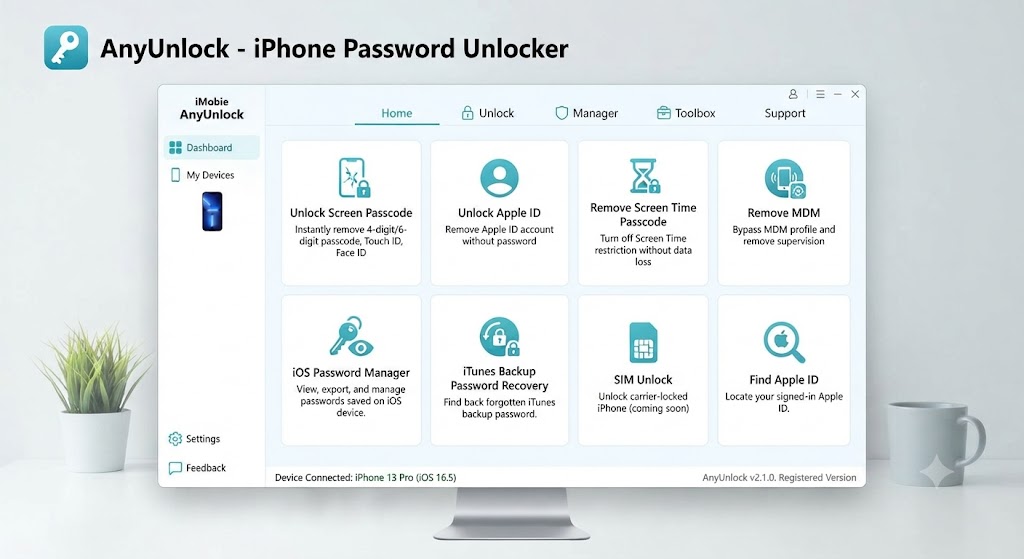
iMobie AnyUnlock is a desktop utility designed to help legitimate iPhone, iPad, and iPod touch owners regain access when they forget a screen passcode, Apple Account password, Screen Time code, encrypted backup password, or device-management credentials. It brings several iOS unlocking and password-management tools into one interface, but its effectiveness depends heavily on the device model, iOS version, lock type, and whether Find My is enabled.
That last point matters. The software is not a universal “one-click fix” for every locked Apple device, and some modes erase data, require a reset, limit device functions, or support only selected hardware.
This guide separates the useful features from the marketing language so you can decide whether the tool fits your situation.
Important: Use unlocking software only on a device you own or are expressly authorized to manage. For a second-hand device linked to another person’s Apple Account, the safest route is to ask the previous owner to remove it from Find My or submit proof of purchase to Apple.
What Is iMobie AnyUnlock?
iMobie AnyUnlock is an iPhone and iPad unlocking toolkit for Windows and macOS. Instead of focusing on one problem, it offers separate modules for screen passcodes, Apple Account removal, iCloud Activation Lock, Mobile Device Management, Screen Time, SIM restrictions, iTunes or Finder backup encryption, saved-password viewing, device verification, and related tasks.
The official product guide lists tools for unlocking a screen passcode, removing an Apple Account, bypassing Activation Lock or MDM, handling SIM and Screen Time locks, recovering backup passwords, finding an Apple Account, verifying an iDevice, and turning off Find My iPhone.
The basic workflow is simple:
- Install the program on a Windows PC or Mac.
- Connect the iPhone, iPad, or iPod touch by USB.
- Select the module matching the exact lock.
- Review compatibility and data-loss warnings.
- Download firmware or follow the on-screen recovery steps.
- Keep the device connected until the process finishes.
The iMobie AnyUnlock interface is easier than using command-line tools, but the underlying process may still involve firmware restoration, recovery mode, DFU mode, account removal, or a complete device reset.
What Can iMobie AnyUnlock Actually Do?
Remove a Forgotten Screen Passcode
The screen-unlock module targets 4-digit codes, 6-digit codes, custom numeric codes, alphanumeric passcodes, unavailable-device screens, and situations where Face ID or Touch ID no longer works. The vendor markets support for iPhone and iPad screen locks across many models.
The trade-off is critical: removing an iPhone screen passcode generally requires erasing the device. That is not unique to this software.
Apple explains that a forgotten passcode cannot be removed while preserving the encrypted data protected by it. Apple also notes that it cannot remove a passcode lock without erasing the device.
Use this mode only when you have an iCloud, Finder, or iTunes backup—or when recovering access is more important than the local data.
Remove an Apple Account from a Device
The Apple Account removal feature is intended for cases where an owner can access the device but cannot sign out of the account currently attached to it. Results depend on the iOS version and whether Find My is enabled.
According to iMobie, when Find My is off, Apple Account removal may be possible without data loss. When Find My is on, some iOS versions require erasing the device, while older versions may behave differently.
There is also an important limitation for devices in Lost Mode. iMobie’s FAQ says the account may be removed locally rather than permanently, meaning the original Apple Account can be requested again after restoration or reactivation.
This difference between local removal and permanent server-side removal is easy to miss. A device may appear usable immediately after the process but request the previous credentials again after an update, reset, repair, or activation attempt.
Bypass iCloud Activation Lock
This is the most sensitive and misunderstood feature in iMobie AnyUnlock. Activation Lock is tied to Find My and Apple’s activation servers; Apple designed it to prevent unauthorized use of lost or stolen devices.
The vendor currently advertises iMobie AnyUnlock Activation Lock support across selected iOS ranges, but its detailed guide shows that compatibility is feature-specific. One section lists older supported hardware such as the iPhone 5s through iPhone X and selected older iPads, while newer sections cover additional iOS versions using different procedures.
Older-device workflows may require jailbreaking and can disable major functions. iMobie’s own guide warns that, in some scenarios, phone calls, cellular data, FaceTime, iMessage, iCloud sign-in, or iTunes use may be unavailable after the bypass.
This means “bypassed” does not always mean “fully restored.” A device that can reach the home screen but cannot use cellular service, Apple services, or normal syncing may have limited practical value.
For a legitimately purchased device, try Apple’s official options first:
- Enter the Apple Account and password originally used on the device.
- Ask the previous owner to remove the device through Find My.
- Contact the organization’s IT administrator for a managed device.
- Submit an Activation Lock support request with proof of purchase.
Bypass or Remove MDM Restrictions
Mobile Device Management is used by businesses and schools to enforce security settings, install profiles, configure applications, and supervise hardware. iMobie AnyUnlock includes modules marketed for bypassing remote-management setup screens and removing local MDM restrictions.
That does not transfer legal ownership or administrative rights. A company or school device may still belong to the organization, remain enrolled in Apple Business Manager or Apple School Manager, or be automatically supervised again after a reset.
A temporary MDM bypass can also differ from full removal. The management screen may disappear during setup, but enrollment can return after erasing or reactivating the device.
Use MDM removal only when the device has been formally released to you or when you are the authorized administrator. For active organizational devices, contact the IT department rather than attempting to remove management controls.
Remove Screen Time and Backup Passwords
The Screen Time fix is aimed at forgotten Restrictions or Screen Time passcode. iMobie promises to save photos, texts, and other data in the case of a successful crack.
The toolkit also offers two features related to creating a backup of data on a computer. The first one is removing the encryption from it, and the second is recovering the forgotten iTunes or Finder password for accessing the backup. Both are separate tasks.
The former implies that further backups will not be protected, and the latter is about finding out the password for the encrypted one. It is important to note that the longer and more complex the password is, the higher the chances of it being unrecoverable are.
Remove a SIM or Carrier Lock
The SIM-lock module is promoted as a way to remove carrier restrictions and use an iPhone with another mobile network. The official store currently lists SIM-lock removal as a separately purchasable tool.
However, users should distinguish between a SIM PIN, carrier activation policy, unpaid-device blacklist, and network lock. They are not the same problem.
Before purchasing third-party software, contact the original carrier and request an official unlock. Carriers may unlock eligible devices free of charge once contract, payment, and account requirements have been satisfied.
A software unlock also cannot remove an IMEI blacklist caused by a lost-device report or unpaid financing balance.
View Saved Passwords and Verify a Device
The password-manager module can scan supported iOS devices for saved Wi-Fi credentials, website logins, mail accounts, and other stored information, then export compatible results. The official store lists this as a separately purchasable feature and says it supports iOS versions later than iOS 5.
The device-verification tool can be useful before purchasing a used iPhone. It can present information such as device status, battery health, jailbreak status, and iCloud-related indicators.
Buyers should still confirm the following independently:
- IMEI and serial number
- Carrier-lock status
- Find My and Activation Lock status
- Repair and replacement-part history
- Battery condition
- Proof of purchase
- Whether the device has been reported lost
- Whether an organization still manages it
A clean-looking device report is helpful, but it should not replace physical inspection and ownership verification.
iMobie AnyUnlock Compatibility: Read the Fine Print
The main product page advertises broad compatibility across iPhone, iPad, and iPod touch models and numerous iOS and iPadOS generations.
That broad statement describes the toolkit as a whole. It does not guarantee that every feature will work on every model and operating-system version.
Before purchasing, verify four separate variables:
- Exact device model: An iPhone X and an iPhone 16 may support different modules.
- Exact iOS or iPadOS version: Minor releases can change firmware and unlocking compatibility.
- Lock type: Screen passcode, Apple Account, MDM, carrier lock, and Activation Lock are separate systems.
- Desired outcome: Accessing the home screen, preserving data, and retaining every network function are different goals.
This is where many disappointing experiences begin. A user sees “supports all iPhones,” buys a license, and later discovers that the specific Activation Lock or Apple Account path has narrower requirements.
Never purchase based only on the general compatibility headline. Open the guide for the exact feature you need and compare its model list, iOS range, data-loss warning, and post-unlock limitations.
Will iMobie AnyUnlock Erase Your Data?
Sometimes, yes. The answer depends on the selected module.
High Data-Loss Risk
- Screen-passcode removal
- Certain Apple Account removal scenarios
- Firmware restoration
- Some Activation Lock processes
- Operations requiring a factory reset
- Recovery procedures that reinstall iOS
Lower Data-Loss Risk in Supported Cases
- Screen Time passcode removal
- SIM-lock removal
- Password viewing
- Device verification
- Some backup-password functions
- Certain account-removal cases when Find My is disabled
Do not rely on a generic iMobie AnyUnlock “no data loss” headline. Read the warning displayed for the exact module, model, and iOS version before clicking Start.
A practical rule is simple: if the tool must remove a device passcode or reinstall firmware, assume the local data may be erased. Back up first whenever the phone remains accessible.
Remember that a backup can also be encrypted. Confirm that you know the backup password and can actually restore the backup before beginning an operation that may wipe the device.
Is iMobie AnyUnlock Safe and Legitimate?
The software is a commercial desktop utility distributed by iMobie, and the official installer is available for Windows and Mac. The vendor says the program is clean and does not upload users’ passwords or personal device data.
Still, “safe” has several meanings.
Installer Safety
Download the installer only from the official iMobie website. Avoid file-sharing pages, unofficial mirrors, “pre-activated” installers, key generators, and cracked-software websites.
A modified installer may contain malware, steal browser credentials, install unwanted programs, or fail during a firmware-sensitive operation.
Data Safety
Some modules intentionally erase or reset the device. That behavior may be necessary for the unlock rather than evidence that the program is malfunctioning.
Read every warning carefully and disconnect the device only when instructed.
Account Safety
Removing an account from the local device does not always remove the account’s connection from Apple’s activation servers. This is especially relevant to Lost Mode and Activation Lock.
The previous Apple Account may reappear after restoring, updating, or reactivating the phone.
Device Safety
Jailbreaking, firmware downloading, DFU mode, and interrupted restoration can create instability. Use a reliable USB cable, a stable computer, and uninterrupted power.
Do not run the process on a computer that is likely to restart, lose power, or disconnect the USB device.
Legal and Ethical Safety
You must own the device or have explicit permission to unlock it. A technical bypass does not establish ownership.
Avoid using the software on devices that are lost, stolen, financed by someone else, managed by an active organization, or still associated with an unknown previous owner.
Pricing, Free Trial, and Refund Terms
iMobie AnyUnlock is free to download, but the free version mainly lets users install the program, inspect the interface, and check whether a device is recognized. Completing an unlock generally requires a paid license.
iMobie AnyUnlock pricing varies by operating system, module, subscription length, number of devices, taxes, and promotions. The official Mac store currently lists individual tools starting at different prices—for example, screen unlock and MDM functions from $45.99, Apple Account and Screen Time modules from $35.99, and several smaller utilities from $25.99 or $29.99.
Prices can change, so treat those figures as current examples rather than permanent rates.
Do not assume the lowest advertised price includes the full toolkit. Check:
- Whether you are buying one module or every module
- Monthly, quarterly, annual, or one-time duration
- Number of supported devices
- Number of permitted computers
- Automatic-renewal status
- Windows versus Mac licensing
- Taxes and currency conversion
- Upgrade eligibility
- Refund conditions for your specific failure
Some users need only Screen Time removal or password recovery. Buying the full package may be unnecessary when a cheaper single-function license covers the problem.
On the other hand, purchasing several modules separately can cost more than the combined toolkit. Compare the final checkout totals rather than the promotional starting prices.
iMobie’s general refund policy lists different windows by plan: seven days for one-month subscriptions, 30 days for quarterly subscriptions, and 60 days for annual or one-time purchases. Refunds are conditional, so review accepted and excluded circumstances before paying.
A money-back period does not necessarily mean every request is automatically approved. Save screenshots of the compatibility claim, error message, device information, order confirmation, and communication with support.
Pros and Cons of iMobie AnyUnlock
Main Advantages
- One interface covers several common iPhone and iPad lock types.
- Guided steps reduce the learning curve for nontechnical users.
- Device verification adds value for used-iPhone buyers.
- Password-management tools extend the product beyond basic unlocking.
- Separate modules may cost less when only one function is required.
- Official guides describe many compatibility and post-unlock limitations.
- Windows and Mac versions are available.
- The trial can help confirm whether the device is detected before purchase.
Important Drawbacks
- Feature compatibility is narrower than the broad device-support headline suggests.
- Some operations erase all local data.
- Activation Lock bypass may not restore cellular, iCloud, or messaging functions.
- Certain older-device workflows may involve jailbreaking.
- The trial does not normally complete the unlock.
- License options can be confusing.
- Refund approval depends on policy conditions.
- A local bypass may disappear after an update or reset.
- No third-party tool can prove ownership.
- It cannot replace Apple’s server-side account recovery process.
Who Should Use iMobie AnyUnlock?
iMobie AnyUnlock makes the most sense for an owner who has already tried Apple’s normal recovery options, knows the exact device and iOS version, accepts the possibility of data loss, and has confirmed that the required module supports that configuration.
It may be useful for:
- An owner locked out by a forgotten screen passcode
- A parent who forgot a Screen Time code
- A user who lost an encrypted backup password
- An authorized technician handling a documented customer device
- An administrator working on a legitimately released MDM device
- A used-device buyer checking hardware and account status
- Someone who needs to export saved credentials from an accessible iPhone
It is a poor choice when ownership is uncertain, the phone is marked lost, essential unbacked-up data must be preserved, or the user expects a permanent server-side Activation Lock removal without the original account holder.
It is also unsuitable when the device has an unpaid financing balance or has been placed on a carrier blacklist. Those issues require resolution with the carrier or seller rather than passcode-removal software.
Better First Steps Before Paying
Before buying iMobie AnyUnlock, use this order of operations:
- Try the Apple Account email addresses and phone numbers you commonly use.
- Reset the Apple Account password through Apple’s official recovery flow.
- Check whether another trusted Apple device can approve the sign-in.
- Look for a recent iCloud, Finder, or iTunes backup.
- Ask the previous owner to remove a used device from Find My.
- Contact a school or company administrator regarding MDM.
- Ask the carrier to remove an eligible network lock.
- Gather the original receipt and request Apple’s Activation Lock assistance.
- Confirm the exact iPhone or iPad model.
- Check the installed iOS or iPadOS version.
- Compare the module-specific guide with that configuration.
- Purchase only after confirming the expected limitations.
This approach protects your money and reduces the chance of turning a recoverable account problem into a wiped or partially functional device.
How to Evaluate the Tool Before Starting
Do not begin by asking, “Can this software unlock iPhones?” That question is too broad.
Ask these instead:
- What exact message appears on the screen?
- Is this a screen passcode or Activation Lock?
- Is Find My enabled?
- Is the device in Lost Mode?
- Can the phone reach the home screen?
- Is the Apple Account password known?
- Is there a usable backup?
- Is the device managed by an organization?
- Is cellular service required after the procedure?
- Will the device need to be reset or updated later?
Once those answers are clear, compare them with the feature guide. This is the most reliable way to judge whether iMobie AnyUnlock is appropriate.
Frequently Asked Questions
Does iMobie AnyUnlock Really Work?
It can work when the selected feature supports the exact device, iOS version, and lock type. Success should not be treated as universal, especially for Activation Lock, MDM, newer firmware, or devices that must retain every function after unlocking.
Users should also distinguish between temporary access and permanent removal. A bypass that reaches the home screen may not remove the previous account from Apple’s servers.
Can iMobie AnyUnlock Unlock an iPhone Without Erasing Data?
Some modules may preserve data, including certain Screen Time, SIM, password-management, and backup-related operations. Screen-passcode removal and several Apple Account or firmware-based procedures can erase the device.
Assume data loss unless the instructions for your precise model and iOS version clearly state otherwise. Make a verified backup whenever possible.
Is iMobie AnyUnlock Free?
The installer and initial compatibility check are free, but completing most unlocking operations requires a paid license. Prices vary by module, operating system, duration, and number of devices.
Check whether the checkout page covers one function or the complete toolkit. Also inspect automatic-renewal terms before submitting payment.
Can AnyUnlock Permanently Remove iCloud Activation Lock?
Not in every scenario. Activation Lock is linked to Apple’s servers, and some bypass methods provide limited device access rather than permanent account removal.
The most reliable permanent solution is removal by the original owner through Find My or assistance from Apple with valid proof of purchase.
Is It Legal to Use iMobie AnyUnlock on a Second-Hand iPhone?
It is generally appropriate only when you legally own the phone and have authorization to manage it. If the device is still linked to another person, marked lost, financed under another account, or owned by an organization, contact the previous owner, seller, IT administrator, carrier, or Apple.
Possessing the phone does not automatically prove that you have permission to bypass its security controls.
Final Verdict: Is iMobie AnyUnlock Worth It?
iMobie AnyUnlock is a broad, user-friendly toolkit, not a guaranteed master key. Its strongest value is convenience: it places passcode removal, account tools, MDM handling, backup-password functions, Screen Time recovery, password viewing, and device checks in one interface.
Its biggest weakness is the gap between broad marketing claims and feature-specific limitations. Compatibility, data loss, permanent account removal, and post-unlock functionality must be evaluated separately.
The smart buying decision comes down to specificity. Identify the exact lock, device model, iOS version, Find My status, data-loss tolerance, and required post-unlock functions before purchasing.
Start with Apple’s official recovery routes. When those fail—and you own or are authorized to manage the device—download the official trial, confirm recognition and compatibility, read the module-specific warnings, and choose the smallest license that solves the actual problem.